Google Forms is an excellent tool for surveys, registrations, or internal company processes. However, as soon as things get a bit more complex, many users hit a limit: Is it actually possible to dynamically populate the answer choices in selection fields (like dropdowns)?
Imagine having a form for internal IT tickets where you want employees to select their device or cost center from a dropdown list. If this data changes weekly, manually updating the Google Form every single time is extremely tedious. Unfortunately, this kind of automatic synchronization isn’t possible with the standard features of Google Forms.
But there is a smart solution to achieve exactly that!
The Solution: The Dynamic Fields Add-on
Those with programming skills could theoretically write their own script using Google Apps Script to read data sources and update the form. For most users and businesses, however, this is far too time-consuming and technically complex.
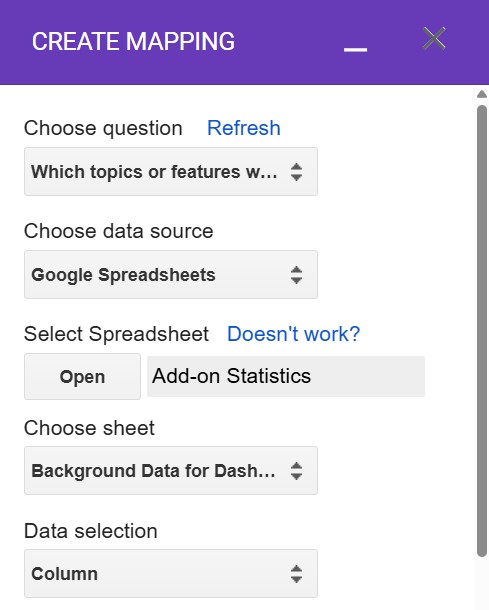
The Google Forms Dynamic Fields Add-on was developed for exactly this target audience. It is the easiest and most practical way to fully automate the population of selection fields in Google Forms and keep them constantly up to date.
With this add-on, you can import values directly into your form from a wide variety of data sources (such as Google Sheets, Google Contacts, Google Calendar, or even third-party systems). For example, if your customer list or product inventory changes in a Google Sheet, the add-on automatically updates the corresponding dropdown fields in your Google Form in the background!
The Features of the Dynamic Fields Add-on at a Glance:
- Automated Form Updates: Fully automate the population of answer choices from external sources.
- Supported Question Types: The add-on works seamlessly with dropdowns, multiple-choice questions, checkboxes, and grid questions
- Versatile Data Sources: Use data from Google Sheets, Calendars, Contacts, Google Groups, or pass data from third-party systems via web services (APIs)
- Exclusive for Google Workspace Customers: Businesses can even load user attributes (like cost centers, departments, or phone numbers) and their own organizational structure directly from the Google Workspace Directory into the form as answer values.
- Unlimited Usage: Once installed, the add-on can be used in an unlimited number of Google Forms within your account.
- Easy Onboarding: A quick start guide and detailed documentation will safely guide you through your first steps.
The add-on adapts to your needs: You can install the basic version completely for free. For advanced requirements (e.g., automatic, scheduled updates), we offer appropriate premium licenses (Plus or Business) with extended features tailored for private users, freelancers, and businesses.
How to Install the Dynamic Fields Add-on:
Setup takes just a few seconds:
- Open any Google Form.
- Click on the three-dot menu in the top right corner and select “Get add-ons”.
- Search the Google Workspace Marketplace for “Dynamic Fields” (or use this direct link: Dynamic Fields Add-on).
- Click the blue “Install” button in the top right corner and grant the necessary permissions.
You will then find the add-on in your form’s top toolbar under the puzzle piece icon (“Add-ons”).
You can find more details about the features, automated updates, and licensing models on our product overview page for the Dynamic Fields Add-on.
You can regularly find more tips & tricks for working efficiently with Google Workspace tools right here on our blog.